Paste Wizard is an easy to use clipboard manager that allows you to save multiple clipboards and be able to paste them again later. It can also be used as a
rapid-access database by labeling
clipboards. It has the following advantages:
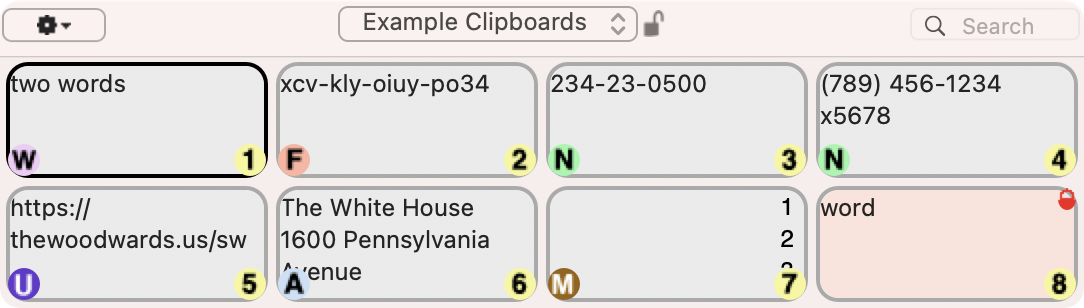
- Compact grid display allows you to see and select from many saved clipboards at once.
- Handles all types of clipboards.
- Clipboards produced by many automatic typing utilities (like TextExpander, Butler, TypeIt4Me, Typinator, Keyboard Maestro, 1Password, etc.) are ignored.
- Recognition of special text types in clipboards allows convenient pasting or operation.
- You can quickly search the grid to find clipboards you want.
- You can edit text clipboards you have already saved.
- You can lock clipboards so they are not displaced by new ones.
- You can delete individual, unlocked, or ALL saved clipboards (for example if they contain sensitive data).
- You can paste multiple clipboards rapidly through three different mechanisms.
- You can securely and easily fill in forms.
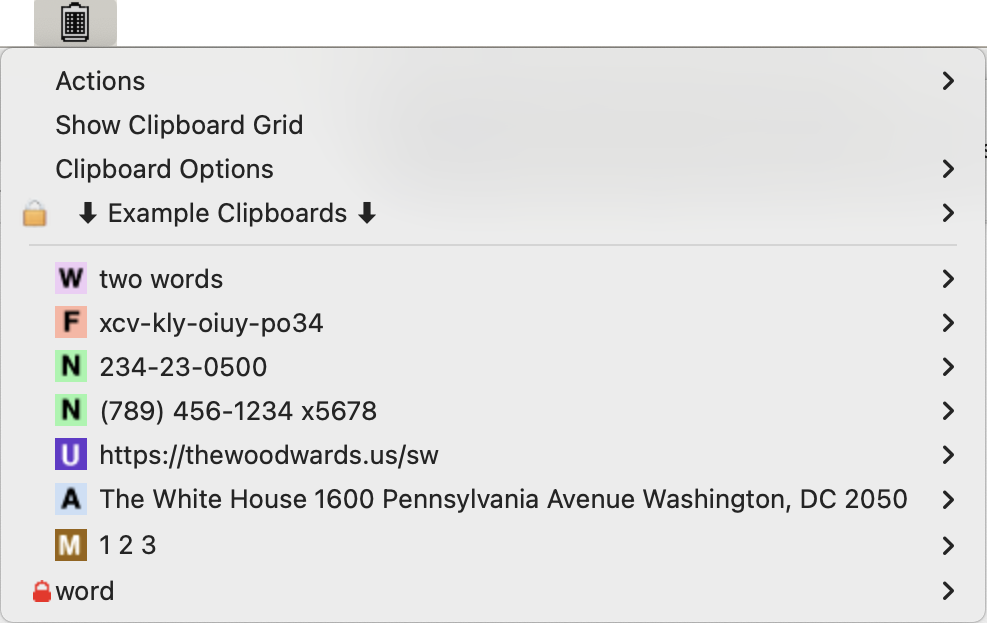
- Clipboards are also optionally available from an icon in the menu bar.
- Security features allow you to minimize sensitive data lying around in saved clipboards.
- You can maintain multiple sets of clipboards for different purposes and with different security settings.
- You can quickly enter notes directly into clipboards for later use.
- You can encrypt your saved clipboard contents.
- You can use Dropbox to backup or synchronize your clipboard contents across multiple machines.
Paste Wizard allows you to display up to 99 clipboards (per set) in a compact manner, making it easy to quickly find which one you want to paste again. Paste Wizard recognizes certain types of text much like Apple's Data Detectors, and allows you to paste or operate on them in special ways. This feature is very useful when dealing with web or database forms that force you to type things like addresses, phone numbers or social security numbers in separate fields, or force you to enter phone numbers with just decimal digits. Furthermore, you can paste clipboards as unformatted text even if they are formatted. This is useful if you want pasted text to inherit the formatting of the application you are pasting into.
Macintosh Requirements
Paste Wizard runs on macOS 10.12.2+.
It is required that the keyboard shortcut on your system to paste is Command-V, and that the keyboard shortcut to copy by Command-C, the common defaults.
Frequently Asked Questions
- When I try to run the program the system says it is from an unauthorized developer. How can I run the application? After you have moved it to the Applications folder, right-click or control-click the application. Ignore any message to trash the application (which may see on macOS 10.15+). If you see an “Open” button, click it. If not, click “Cancel”, then right- (or control-) click the application AGAIN. This time you should see the “Open” button. Click it and you will be asked again if you want to run the application. After you run the application once via this “Open” button, you will not be asked again and you can launch the application in any manner. If you are running macOS 15+, follow the instructions HERE.
- How does Paste Wizard differ from your earlier application Paste Master? There are 2 main differences:
- Paste Wizard is a modern 64-bit application that runs on macOS 10.12+, whereas Paste Master is a 32 bit application that ran on macOS 10.5+. macOS 10.15+ will not run 32 bit applications.
- Paste Master was a preference pane that was configured using System Preferences, whereas Paste Wizard is a regular application.
- Why do you allow backup and syncing via Dropbox but not via iCloud? Dropbox is used for backwards compatibility with the legacy application Paste Master.
- I have already purchased Paste Master, do I have to pay again for Paste Wizard? Because Paste Wizard is a complete re-write of the application and will persist after Apple stops running 32-bit applications, there is a charge to purchase Paste Wizard. Of course, you can continue running Paste Master on systems prior to macOS 10.15.
- Will Paste Wizard use my saved preferences from Paste Master? Yes.
- Why won't my clipboards Paste? If you are running on 10.14 or later, you must re-authorize Paste Wizard to control your computer when installing or
after upgrading it.
In System Preferences->Security & Privacy-> Accessibility (pre-macOS 13) or System Settings->Privacy & Security-> Accessibility (macOS 13+) you should
see Paste Wizard shown. Even if it is checked,
you must DELETE it and then click the + to add it again. You will have to click on the lock icon and enter your
password before doing so. If for some reason Paste Wizard does not appear there, you will need to click the plus sign and add Paste Wizard, which should be in your
Applications folder.
- Where is Help available? From the grid, pull down the menu in the upper left corner, and choose "Help" under "Actions". If you need to contact the author to report a bug or ask for help, please do so only by using the "Email The Author" function under "Actions". This will provide me with debugging info that allows me to better answer your question.
- I want to use my clipboards with a different user account on my machine. How do I do this? If you are saving in your clipboards in your Dropbox (or some other folder you specified), you can just point to that folder in the Paste Wizard preferences for the new user. If you are not saving your clipboards in a folder you specified, then they are stored in the folder "Application Support" in the folder "Library" in your home folder. They will be in a folder named "Paste Wizard" or possibly "Paste Master" if you originally used that program. In rare circumstances, you could have both folders. If that is the case, the one with the most recent modified date is the one Paste Wizard was using. To move it to the new account, quit Paste Wizard in the new account, move the "Paste Wizard" or Paste Master" folder to the "Application Support" folder for the new account, then launch Paste Wizard.
- How do I transfer my saved clipboards to a new machine?
First, make sure that Paste Wizard is disabled on all machines using it. If you have your clipboards in Dropbox or some other cloud storage, then you should be able to just reference them via the Preferences on your new machine. If you are not saving your clipboards in a folder you specified, then they are stored in the folder "Application Support" in the folder "Library" in your home folder. They will be in a folder named "Paste Wizard" or possibly "Paste Master" if you originally used that program. In rare circumstances, you could have both folders. If that is the case, the one with the most recent modified date is the one Paste Wizard was using. To move it to the new machine, make sure Paste Wizard is not running on the new machine, move the "Paste Wizard" or Paste Master" folder to the "Application Support" folder for your account on the new machine, then launch Paste Wizard on the new machine.
Release Notes
1.0 - Initial Release.
1.1 - Bug fixes; updated Help.
1.2 - Feature enhancements:
- Added the option to changes the size of clipboards in the menu bar menu.
- You can now paste into the Registration dialog.
1.3 - The helper application that launches upon login no longer appears in the Dock.
2.0 - Feature enhancements and bug fixes:
- If you are running macOS 10.14+, you will be warned to re-authorize Accessibility for Paste Wizard after updating.
- Improved registration feedback.
- Spurious error message about lost clipboards no longer appears upon first run.
- The correct item is now pasted from the Menu Bar menu.
3.0 - Feature enhancements and bug fix:
- Improved performance in general, and dramatically if you are encrypting your clipboards.
- Changed the Application-Specific Preferences to allow clipboards from a specified application to be completely ignored, rather than just not saved as is currently the case.
- Fixed bug related to deleting an application from the Application-Specific preferences.
3.1 - Not released.
3.2 - Bug fix and improved debugging support:
- Added clipboard export and import functions for debugging support.
- Improved debugging information provided with "Email The Author".
- Fixed bug in hovering over images in the grid.
- Fixed bug in recognition of copied URLs.
3.3 - Feature enhancements and bug fixes:
- Added the ability Lock all clipboards in the current set.
- Added the ability to go to all URLs in the current set.
- Added the ability to search for text in a clipboards beyond just the current set.
- Fixed bugs relating to the proper indication of configuration options in the grid and menu bar menus.
- Fixed bug in unlocking all clipboards.
- Fixed bug in not correctly categorizing a clipboard after it is edited.
- Updated documentation.
4.0 - Grid modernization:
- Updated grid look based on multiple user requests.
- Added "Grid Configuration" option to choose current or classic grid look.
4.1 - Fixed bug in saving grid changes after rearranging the grid by dragging.
5.0 - Feature enhancement and bug fix:
- Added support for Dark Mode.
- Fixed display glitch with new grid style help.
6.0 - Feature enhancements and bug fix:
- When the new (non-classic) grid is displayed, you can hit the
space bar to hide/show the markings that can obscure parts of
each clipboard.
- Switching to a new clipboard set no longer copies any
specified search term to the new set. Use Search Again
(Command-G) for that.
- Added command to switch to the previous clipboard set
(Command-Option-S).
- Further Dark Mode visual improvements.
- Prevented command-q from quiting the app when grid is displayed.
- Updated Help Viewer.
- Corrected error in documentation.
- Fixed bug in key modifiers preferences error checking.
7.0 - Feature enhancements and bug fixes:
- Added Touch Bar support for MacBooks so-equipped.
- Fixed bug in pasting digits together when type-by-default is specified.
- Fixed bug in displaying Preferences.
7.1 - Fixed update notification glitch.
8.0 - Universal Application and bug fixes:
- This is a universal application that runs natively on Apple Silicon.
- Fixed bug with the "Delete After Pasting" item in the menu bar menu.
- Restored the "Clipboard Size" menu in the menu bar menu.
8.1 - Compiled as non-Universal because Universal would not launch on M1 chip (thanks, Apple!)
9.0 - Major feature enhancements and bug fixes:
- Clipboard sets, other than the "Main" set, can now be locked
so they store no more clipboards you have copied. This is useful
if you use sets to store fixed items of information, such as
information about your credit cards, loyalty numbers, social
security number, passwords, etc.
- The grid title bar now contains an popup menu allowing you to
change the clipboard set or edit clipboard sets.
- If you have multiple clipboard sets, the grid title bar now
contains--for sets other than "Main"--a lock icon showing
whether the set it locked. You can click on the icon to
change the set locked status.
- In the menu bar menu, if you have multiple clipboard sets, the
"Clipboard Sets" menu now contains the name of the current set,
such as "⬇︎ Main ⬇︎", as well as a lock icon for sets other than
"Main". You can click on the lock or set name to change
the set locked status.
- As a convenience, the menu bar menu now automatically
re-displays after you choose an option that does not paste
anything, such as "Delete After Pasting".
- rtsp:// URLs are now recognized as URLs.
- Added option to specify that saved URLs should be opened by
default when chosen (instead of being pasted).
- In the grid, the larger version of a clipboard shown when you
hover is now shown as long as you keep hovering.
- Improved syncing among multiple machines.
- Improved the red clipboard locked icon.
- Fixed bugs related to the handling of sets.
- Fixed bug in moving or copying an image clipboard to a
different set.
9.1 - Enhancements and bug fixes:
- Added ability to produce debugging information if you do not use a mail application.
- Improved compatibility with macOS's ever-growing security constraints.
- Fixed bug in pasting via the menu if you have no sets.
- Fixed bug in cancelling out of Dropbox syncing.
- Fixed bug in editing sets.
9.2 - Bug fix:
- Fixed bug in locking/unlocking via the menu if you have no sets.
10.0 - Enhancements and bug fix:
- Saved clipboards can now be labeled.
- Added options to better eliminate duplicate clipboards.
- Updated icon.
- Fixed rare bug causing registration to be forgotten.
10.1 - Feature enhancements and bug fixes:
- Added select mode: the ability to select multiple clipboards in the grid and operate on them (e.g. delete, lock, move to a different set).
- Improved handling of non-standard URLs.
- Fixed miscellaneous bugs.
11.0 - Feature enhancements:
- Added key modifier to type a text clipboard.
- System clipboard will now contain the last pasted item when locked item is pasted (unless delete after pasting is specified).
- Worked around non-standard clipboards in BBEdit and Microsoft Word (to allow for copied addresses to be recognized).
- Clipboard sets can now be reordered in the Edit Clipboard Sets dialog.
- Improved error checking when moving clipboards between sets.
- Universal application that runs natively on Apple Silicon.
- Updated for Ventura (macOS 13).
11.1 - Feature enhancement and bug fixes:
- Added the label to the edit clipboard dialog.
- Improved visibility of labels in Dark Mode.
- Fixed bug in "Create Multiple Clipboards".
11.2 - Feature enhancements:
- Copy and Paste now work when editing clipboards or labels.
- Improved functioning of status item menu.
11.3 - Feature enhancements and bug fixes
- Added "Make A Copy" function to allow a text clipboard to be
copied, presumably to edit it into a similar clipboard.
- Improved compatibility with MacOS 13+.
- Fixed multiple unreported bugs.
12.0 - Modernized Icon & Bug Fixes.
12.1 - Feature enhancement and bug fixes:
- Added preference to use the classic yellow menu bar icon.
- Fixed multiple unreported bugs with paste multiple and drag
modes.
12.2 - Fixed glitch caused by latest Apple compiler.
13.0 - Feature enhancements and bug fix:
- Edit clipboard function improved:
- All clipboards can now be edited (not just text clipboards).
- If you have multiple clipboard sets, you can now specify
moving clipboard to a different set.
- Labels and lock can also be edited.
- Cut and paste now work.
- Label function removed as it is now redundant with Edit.
- You can generate random passwords when entering notes.
- Now all clipboards can be copied.
- Images are now printed full size.
14.0 - Feature enhancements and bug fixes:
- Made menu bar menu more compact to show more clipboards.
- Added "Use Classic menu" to Preferences to not use the new
menu bar menu.
- Improved support for multiple screens.
- Worked around an Apple bug that caused the grid to not display
when the cursor is in a secure input field (e.g. Password field
in a browser).
- Improved clipboard sets menus in grid and menu bar.
- Clarified and enforced that clipboard set names must be case-insensitively unique.
- Fixed multiple unreported bugs.
14.1 - Feature enhancements:
- Improved workaround of Apple bug that caused the grid to not display when the cursor is in a secure input field (e.g. Password field in a browser).
- Added the ability to enter a note clipboard to the menu bar Actions menu.
- Added 2 features inadvertantly left out of the previous release:
- Improved clipboard sets menus in grid and menu bar.
- Clarified and enforced that clipboard set names must be case-insensitively unique.
14.2 - Fixed bug with multiple "General Configuration" menu items.
15.0 - Feature enhancements and bug fixes:
- Updated for macOS 15 (Sequoia).
- Added two new grid sizes, "Fill" and "Dynamic", specified in
the grid menu.
- Added the ability to show full size images when hovering over
a clipboard in the grid that contains an image, specified in the
grid menu.
- Added a button to save and paste an entered note clipboard.
- Improved workaround of Apple bug that caused the grid to not display when the cursor is in a secure input field (e.g. Password field in a browser).
- Fixed multiple unreported bugs.
15.1 - Bug and typo fixes:
- Fixed bug in specifying hotkey preferences.
- Fixed bugs in entering note clipboards.
- Fixed bug in saving clipboards set changes.
- Fixed typo in application-specific preferences.
16.0 - Feature enhancements and bug fixes:
- Added a new search function that searches across all clipboard
sets via a dialog. It searches for specified text in text
clipboards or labels, and then can perform most functions on the
result (e.g., Paste, Print) or shows you the clipboard in the
grid. This function is accessible from all "Actions" menus or
via a new hotkey that can be enabled in the preferences.
- Added a hotkey to toggle the grid view between its current
size and the dynamic size. The hotkey must be enabled in the
preferences.
- Fixed multiple unreported bugs.
17.0 - Added a major new feature for clipboard sets users: the ability to specify in the application-specific preferences that clipboards copied from a particular application should go into the specified set.
18.0 - Updated for macOS 26 (Tahoe)
19.0 - Added an application-specific copy preference to specify
that clipboards from the application should always be copied. This
would be used for an application like the Tor Browser that marks
all their clipboards as secure (and hence not normally copied).
20.0 - Feature enhancements and bug fixes:
- Added hotkey to temporarily suspend saving clipboards, and
reorganized Preferences to accommodate this change.
- Allowed pasting unto Registration dialog
- Fixed bug that clipboards copied after waking from sleep may not be saved.
- Fixed some Preferences UI glitches.